Classroom To Google How Use
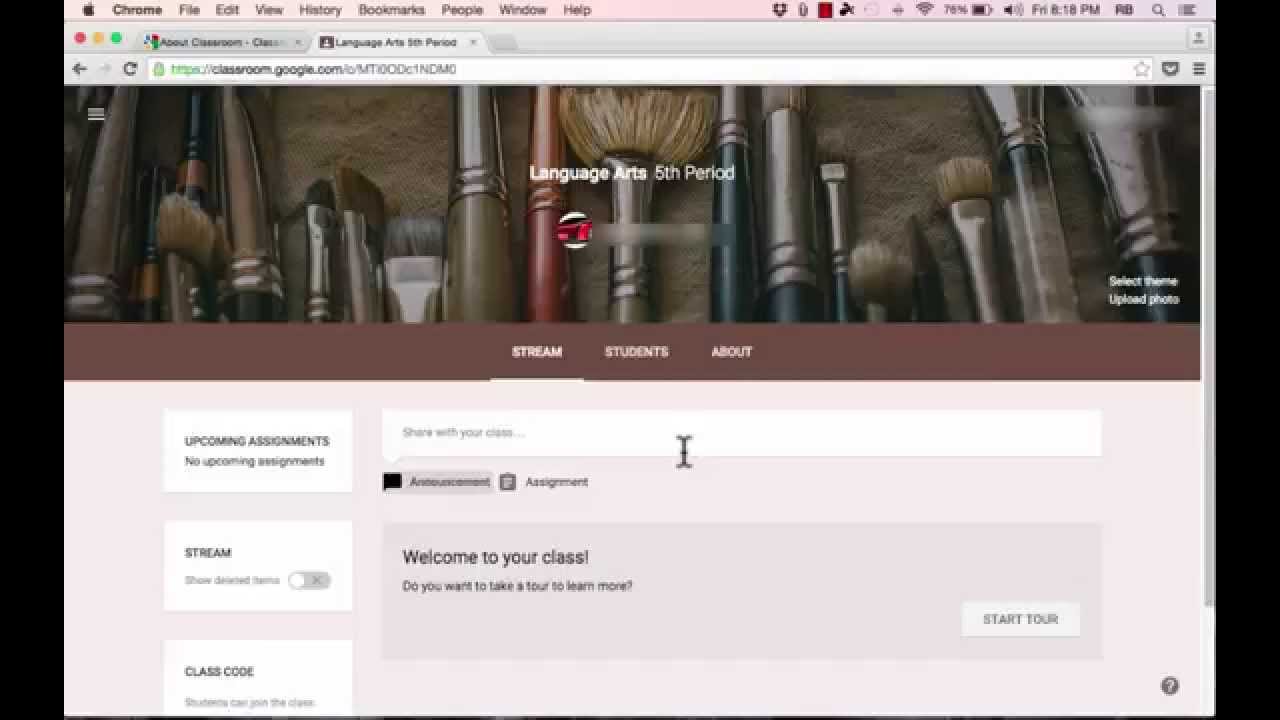

Google worked with educators across the us of a to create classroom: a streamlined, clean-to-use tool that facilitates instructors control coursework. with classroom, educators can create instructions, distribute assignments, grade and send remarks, and spot the entirety in a single region. A way to use google classroom on mobile in hindi the way to create and join virtual lecture room on mobile period: sixteen:00. the rajneesh karn fifty two,197 views.
Sign In Google Accounts Google School Room
Earlier than you can learn how to use google study room, it’s vital to realize a piece greater about what it's miles. this is how google describes study room: lecture room is a free web-based totally platform that integrates your g suite for training account with all of your g suite offerings, such as google docs, gmail, and google calendar. classroom saves time and. Google classroom allows instructors to create a web classroom area in which they can manage all the files that their students need. instructors can make assignments from within the class, which their college students whole and flip in to be graded. comply with these steps to create a class: open a web browser and visit lecture room. google. com. Navigate to study room. google. com. you could do that via getting into the url into the bar on the top of chrome and urgent ↵ enter or ⏎ go back.. college students may be redirected to the magnificence web page with the option to join a new magnificence through clicking the "+" icon on the top of the display.
A Way To Create A Category In Google Study Room Dummies
Google study room is a unfastened software designed by way of — take a wager — google. google lecture room facilitates instructors and college students to speak and may be used to organize and manipulate assignments, to move paperless, for collaboration among college students and among instructors, for teaching from a distance, and so on!. What's google study room? 1. developing a category classroom to google how use and including students google study room permits you to create a unique class for each magnificence which you 2. using google study room assignments assignments are a super manner to accumulate student work and provide your college students with 3. spark discussions with the.
See all full listing on teachthought. com. 60 smarter approaches to use google school room. whilst an task, lesson, or unit doesn’t paintings, upload your personal feedback–or have college students add their personal comments), then tag it or shop it to a exclusive folder for revision. align curriculum with other teachers. share records with professional studying community. keep samples of exemplar writing for. Register google bills google school room.
Guidelines for using google classroom dummies.
Google school room the teacher’s guide to google lecture room google classroom is a free software designed to help students and instructors speak, collaborate, arrange and control assignments, cross paperless, and much greater! this manual is chocked full of step-via-step instructions for the usage of google classroom, putting in. Discover ways to use google docs for your lecture room to make learning thrilling in your students and trainer existence plenty easier for you! jessica carrell on january eleven, 2017 as a teacher, you probably recognize approximately google doctors. Use the questions characteristic. whilst google school room does not have a test or quiz making device, you could use the questions characteristic to ask students a couple of preference questions and get hold of scores at once. grade assignments. instructors can also grade assignments within google study room and comment on pupil work. google lecture room also stores grades.
Apr sixteen, 2020 · suggestions to help kids with google classroom to google how use study room 1. use multiple devices. our son makes use of google lecture room on a chromebook (right here’s our manual to the quality ones), thru an assigned in-faculty username and. Sep 17, 2018 · discover ways to use the new google classroom as a studying control machine to educate a category of students. this video can also be useful from the pupil's factor of view. google has introduced several. See all full listing on dummies. com. Usegoogle apps to create files. due to the fact google classroom is primarily based on google pressure, all the google power apps (which includes medical doctors, sheets, slides, and so on) are absolutely integrated into school room. so for instance, when you create a homework worksheet in google doctors, a scholar can open the report in google doctors, entire the paintings, and turn it in.
How To Use Google Lecture Room The Tech Edvocate

In case you're using a g suite for training account, click on i’m a scholar or i’m a trainer. note: users with personal google money owed won’t see this selection. click on get commenced. geared up to begin using lecture room? instructors—see create a category. students—see join a class. Google labored with educators throughout the united states to create lecture room: a streamlined, easy-to-use tool that facilitates teachers manipulate coursework. with study room, educators can create training, distribute assignments, grade and send feedback, and notice everything in one area. See all complete list on newedtechclassroom. com.


May additionally 29, 2020 · google classroom a way to use google classroom google lecture room recommendations and tricks 2020 hindi is video mein hum ne bataya hai ki google study room supply. Usegoogle bureaucracy to offer your students a pre-evaluation at the beginning of class. alter your instruction based at the results. 32: expand study room discussions the use of moderator. have college students mirror on their daily mastering thru google moderator. students can examine every different's reflections and vote up the responses that they like the best. Google school room is included as a unfastened service for every body with a personal google account, and it is also loose for organizations the usage of g suite for training or g suite for nonprofits. in maximum cases, teachers and college students can get right of entry to google lecture room the usage of a google account supplied by their school.
While we think of the classroom, we recollect the rows of desks, the blackboard and the trainer presiding over all of the kids. but the functions of google school room are nothing like that. examine directly to find out the google study room academic on how to use and classroom to google how use google study room’s tips. faculties using ar and vr for scholar getting to know. Google study room pointers and tricks. right here are a few thoughts for maximizing your use of google school room for your “lessons” web page (click the three traces menu button and “training”), click and drag your elegance cards across the web page to reorder them. whenever you spot a folder icon, click on it to open that class’s google school room folder in google pressure.. that is in which pupil paintings lives while it. Reliable google classroom help middle in which you may discover pointers and tutorials on using google study room and different answers to frequently requested questions.
Mar 30, 2020 · In addition to assigning and grading paintings, google school room lets in you to communicate with students via electronic mail. it's also viable for parents and guardians to acquire electronic mail summaries to keep them informed of cutting-edge and upcoming activities. watch the video underneath to learn how to talk with students in google lecture room. Check in google accounts google lecture room. May additionally classroom to google how use 31, 2020 · on this video we provide an explanation for to the viewers the way to join a category in google classroom. this video explains the functioning of google school room. music: www. bensound. com.


Komentar
Posting Komentar